

MODO
Bamboo supports MODO for instant bank-transfer payments in Argentina. Merchants can integrate MODO using one of two implementation options:
- Hosted (Redirect): to a Bamboo-hosted payment page, from which the payer is then redirected to either the MODO app or the payer’s linked bank app, depending on the device, OS, and available applications.
- Custom (QR & Deep Link): Bamboo returns a QR payload and a Deep Link, allowing the merchant to fully control the UX on web/app.
This payment method can also provide access to bank-specific cashback promotions.
MODO Hosted (Redirection Flow)
The Hosted flow enables the payer to complete the transaction by being redirected to a payment URL hosted by Bamboo. This method utilizes the MODO SDK and automatically handles the complete payment flow via MODO across all devices (desktop and mobile).
Payment Flow
This method uses a Redirection flow. The initial API response includes an Action object, and the purchase remains in Pending status until the customer completes the payment on the hosted payment page.
- The merchant creates a purchase request with the required details.
- Bamboo returns the PENDING status and the Action object containing the MODO hosted payment URL.
- The payer is redirected to the MODO payment page.
- On the MODO page, the payer selects their funding source (linked bank account/card) and confirms the transaction.
- MODO processes the payment and redirects the payer to the merchant's defined result URL (Url_Approved, Url_Rejected, etc.), also sending the final status asynchronously to the configured Webhook URL.
Desktop flow:
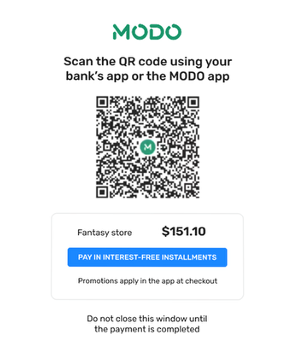
The customer selects MODO as payment method, Bamboo displays a payment modal centered on the screen, showing a QR code and clear instructions to continue the payment using MODO.
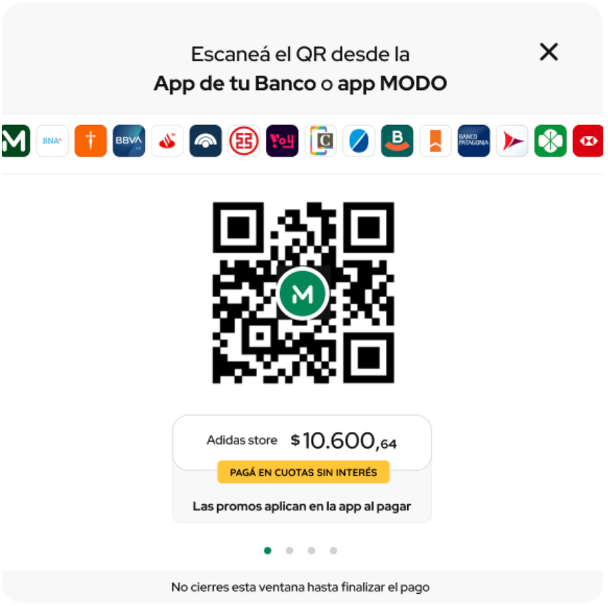
The customer opens the MODO app or their bank app on their mobile device and scans the QR code displayed on the screen.
As the customer completes the payment, the modal updates automatically to guide them through each step until the process is finished.
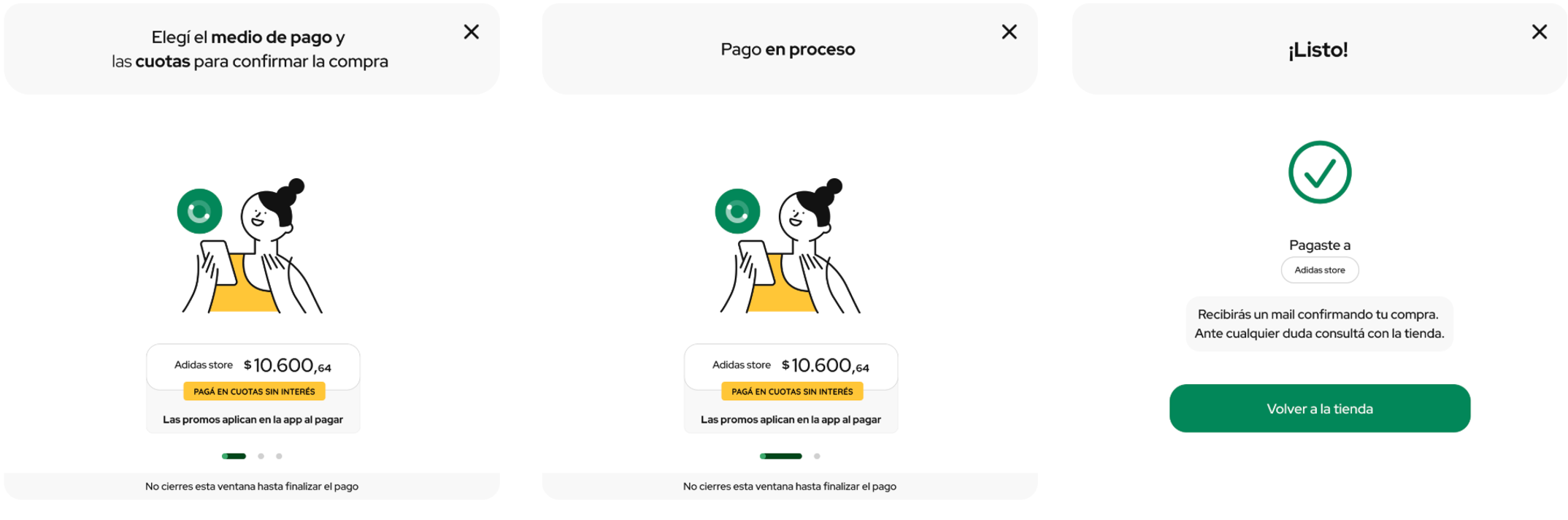
The customer opens the MODO app or their bank app on their mobile device and scans the QR code displayed on the screen.
After scanning the QR, the payment opens inside the selected app. The customer chooses the account or card they want to use and confirms the payment within the app.
Once the payment is confirmed, the modal updates automatically to reflect the payment status.
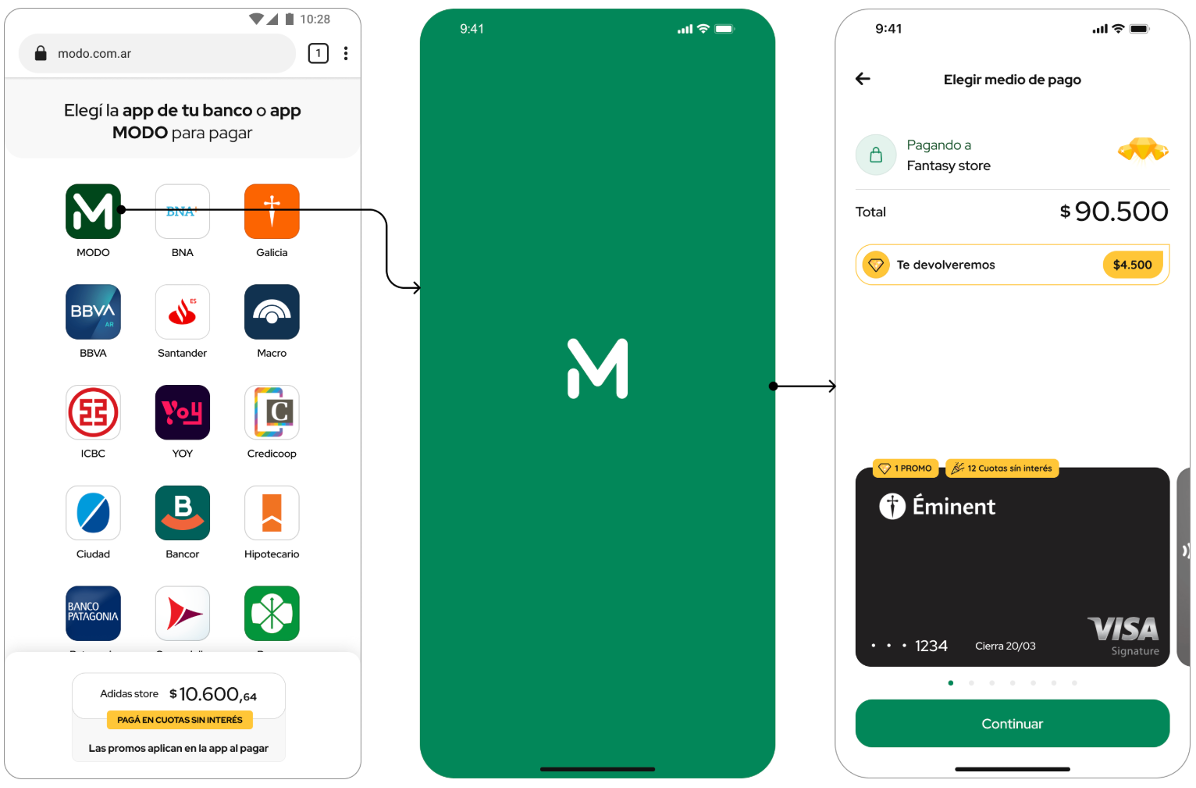
Payment ExpirationIf the payment is not completed within the configured time (
PaymentExpirationInMinutes), the transaction is automatically canceled. The maximum value is 10 minutes.
Request parameters
You need to include specific fields for this payment method to work correctly.For details on authentication, response formats, and base parameters (amount, currency, etc.), refer to the Purchase operation guide.
| Property | Type | Mandatory? | Description |
|---|---|---|---|
PaymentMethod | string | Yes | Payment method code. Use MDO |
Customer → Email | string | Yes | Payer email. |
MetaDataIn → IntegrationMode | string | Yes | Possible values are (Hosted, Custom). Hosted is the default value. |
MetaDataIn → PaymentExpirationInMinutes | numeric | No | Expiration time in minutes for the payment. Possible value: from 1 to 10 minutes. If not provided, the default value is the maximum: 10 minutes. |
Redirection → URLs | string | No | Redirection object where the merchant URLs are specified for the final redirection after the payment is completed. |
Example Request
To test this endpoint, use the API Reference or the Postman Collection
{
  "PaymentMethod": "MDO",
  "TargetCountryISO": "AR",
  "Currency": "USD",
  "Amount": 1,
  "Installments": 1,
  "Order": "Automation-999",
  "Description": "Dev Test",
  "Customer": {
  	"Email": "[email protected]"
  },
  "MetadataIn": {
    "IntegrationMode": "Hosted",
    "PaymentExpirationInMinutes": 6
  },
  "Redirection": {
    "Url_Approved": "https://dummystore.com/checkout/response",
    "Url_Rejected": "https://dummystore.com/checkout/response",
    "Url_Canceled": "https://dummystore.com/checkout/response",
    "Url_Pending": "https://dummystore.com/checkout/response"
  }
}
Response Parameters
The following example shows the response to the request. For additional information about the response structure, refer to the Response parameters section of the Purchase creation guide.
The purchase is created with status PENDING.
{
"TransactionId": "258995494364219136",
"Result": "ACTION_REQUIRED",
"Status": "PENDING",
"ErrorCode": null,
"ErrorDescription": null,
"Created": "2025-12-15T16:35:37.771",
"AuthorizationDate": "2025-12-15T16:35:38.686",
"AuthorizationCode": null,
"Amount": 108739,
"Currency": "ARS",
"Installments": 1,
"TaxableAmount": null,
"Tip": null,
"Url": "https://api.stage.bamboopayment.com/v3/api/transaction/258995494364219136",
"MetadataOut": {},
"Action": {
  "SessionId": "CA_bdfd1497-2505-49bf-8660-3a5ccff6dddd",
  "URL": "https://modo.stage.bamboopayment.com/modo/258995494364219136",
  "Reason": "REDIRECTION_NEEDED_EXTERNAL_SERVICE"
},
"PaymentMethod": {
  "Brand": "ModoQr",
  "CardOwner": null,
  "Bin": null,
  "IssuerBank": null,
  "Type": "BankTransfer",
  "Expiration": null,
  "Last4": null
},
"CardOnFile": null
}
MODO Custom (QR & Deep Link) The Custom flow allows the payer to complete the transaction using a QR code (for desktop/POS) or a Deep Link (for mobile). Both are returned in the purchase response, giving the merchant full control over the payment experience on their site or app.
Payment Flow This flow is designed for a custom integration where the merchant is responsible for displaying the payment instructions. The purchase is initially created with the PENDING status.
- The merchant creates a Purchase request.
- Bamboo generates the payment order, returning the PENDING status and a MetadataOut object containing the Base64 QR code and the Deep Link.
- For Desktop: The merchant displays the QR code (Base64 image). The payer scans the QR using the MODO app or the linked bank app.
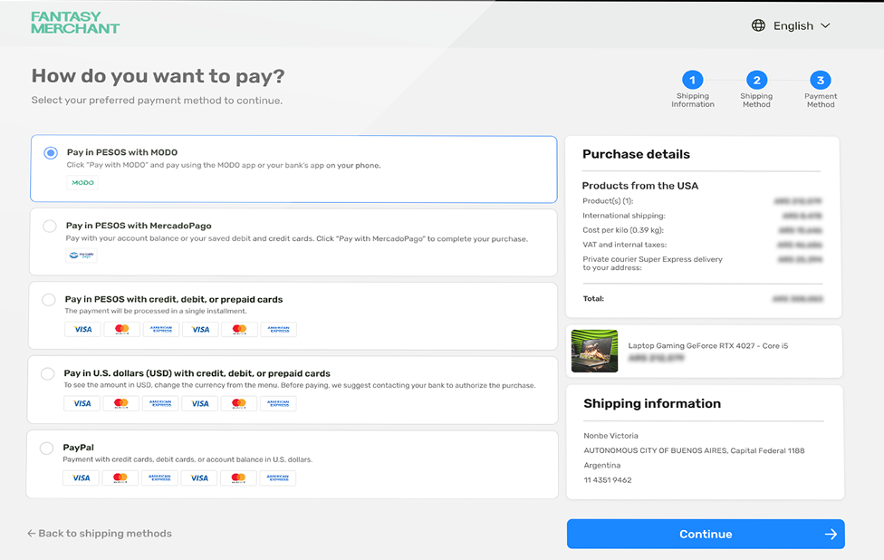
- For Mobile: The merchant uses the DeepLinkUrl to open the MODO app or bank app directly on the payment confirmation screen.
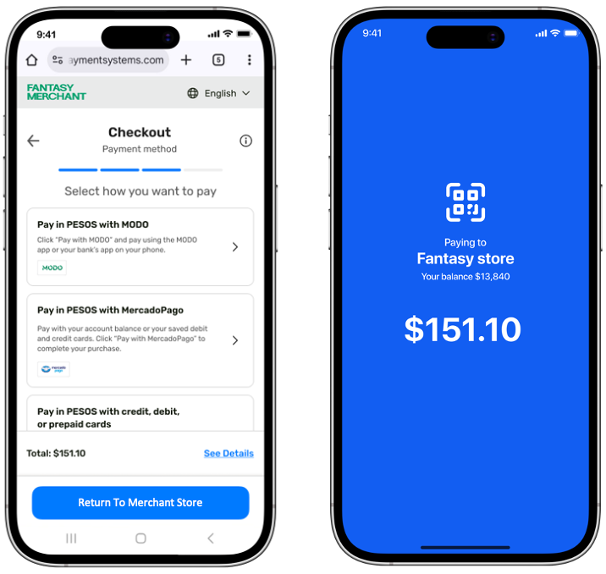
- The payer authorizes the transaction within the application.
- The transaction remains PENDING until MODO confirms the payment. Bamboo sends the final status asynchronously to the Webhook URL.
Request Parameters
You need to include specific fields for this payment method to work correctly.For details on authentication, response formats, and base parameters (amount, currency, etc.), refer to the Purchase operation guide.
Example Request To test this endpoint, use the API Reference or the Postman Collection
{
  "TargetCountryISO": "AR",
  "Currency": "USD",
  "Amount": 1,
  "Installments": 1,
  "Order": "Automation-999",
  "Description": "Dev Test",
  "Customer": {
  "Email": "[email protected]"
  },
  "MetadataIn": {
  "IntegrationMode": "Custom",
  "PaymentExpirationInMinutes": 6
  },
  "Redirection": {
  "Url_Approved": "https://dummystore.com/checkout/response",
  "Url_Rejected": "https://dummystore.com/checkout/response",
  "Url_Canceled": "https://dummystore.com/checkout/response",
  "Url_Pending": "https://dummystore.com/checkout/response"
  },
  "PaymentMethod": "MDO"
}
Response Parameters
The following example shows the response to the request. For additional information about the response structure, refer to the Response parameters section of the Purchase creation guide.
The purchase is created with status PENDING.
Example Response
{
    "TransactionId": "258995900200879872",
    "Result": "COMPLETED",
    "Status": "PENDING",
    "ErrorCode": null,
    "ErrorDescription": null,
    "Created": "2025-12-15T16:37:14.737",
    "AuthorizationDate": "2025-12-15T16:37:15.743",
    "AuthorizationCode": null,
    "Amount": 108739,
    "Currency": "ARS",
    "Installments": 1,
    "TaxableAmount": null,
    "Tip": null,
    "Url": "https://api.stage.bamboopayment.com/v3/api/transaction/258995900200879872",
    "MetadataOut": {
        "CodeQr": " 00020101021226370015ar.com.modo.ipg01...",
        "Base64Qr": " data:image/png;base64,iVBORw0KGgoAAAANSUhEUgAA...<truncated>",
        "Deeplink": " https://www.modo.com.ar/pagar/?qr=00020101...",
        "ExpirationDate": "2025-12-15T16:43:15.000Z"
    },
    "Action": null,
    "PaymentMethod": {
        "Brand": "ModoQr",
        "CardOwner": null,
        "Bin": null,
        "IssuerBank": null,
        "Type": "BankTransfer",
        "Expiration": null,
        "Last4": null
    },
    "CardOnFile": null
}
Updated 3 months ago