

Bre-B
Bre-B is a payment solution available in Colombia that enables users to make payments either by scanning a QR code or by entering a unique transaction key (account alias) through a banking application or digital wallet. Each transaction generates a dynamic key that can only be used once. If the amount sent does not match the original payment request, the transaction is automatically reversed and the money is returned to the payer. Bre-B operates as a secure real-time payment network managed by Colombia’s central bank.
Bre-B QR
Enables the payer to scan a QR code using the home banking app to complete the transaction. The QR code is returned in the purchase response as a base64 image.
Payment flow
-
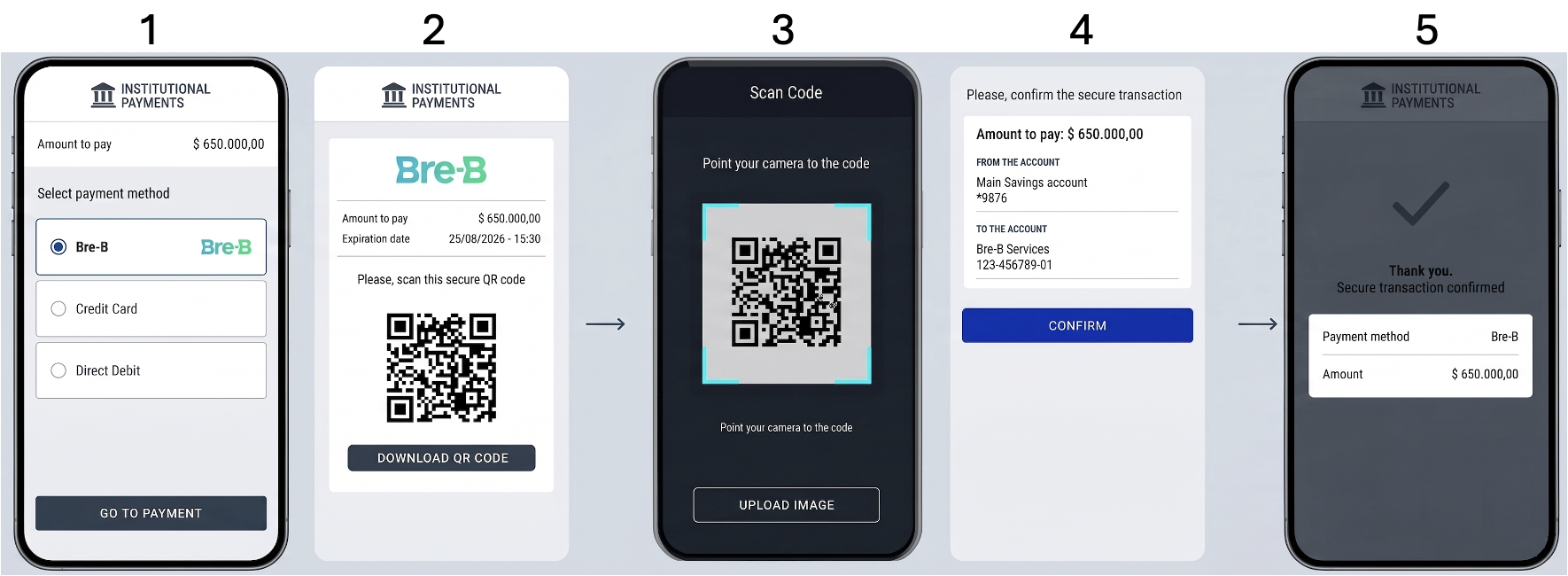
The customer reaches the checkout page and selects Bre-B QR as the preferred payment option.
-
A Bre-B payment voucher is generated and displayed. The customer can scan the QR code or download it as an image.
-
On their banking application, the customer scan the QR code or upload the saved image.
-
The banking app shows the payment information so the customer can review and authorize the transaction.
-
Once the payment is approved, the merchant’s website receives the confirmation and completes the purchase flow.
Request parameters
The following parameters are required specifically for this payment method.
Refer to the Create a Purchase guide for authentication and global fields such as Amount, Currency, and Order.
| Property | Type | Mandatory | Description |
|---|---|---|---|
PaymentMethod | string | Yes | Must be BBQ. Refer to the Payment Methods table. |
TargetCountryISO | string | Yes | Country code. Must be CO. |
Customer → Email | string | Yes | Customer’s email address. |
Customer → FirstName | string | No | Customer’s first name. Recommended. |
Customer → LastName | string | No | Customer’s last name. Recommended. |
Customer → DocumentType | string | Yes | Use a valid value from the Document types table |
Customer → DocumentNumber | string | Yes | Customer’s Identification number. Document Types – Colombia. |
Customer → PhoneNumber | string | No | Customer phone number. Recommended. |
MetaDataIn → PaymentExpirationInMinutes | numeric | No | Defines the expiration time for the payment in minutes |
Request example
To test this endpoint, use the API Reference or the Postman Collection
{
    "PaymentMethod": "BBQ",
    "Order": "CH2023-001",
    "TargetCountryISO": "CO",
    "Amount": 100100,
    "Currency": "COP",
    "Description":"Purchase Test",
    "Customer": {
        "Email": "[email protected]",
        "FirstName" : "John",
        "LastName": "Doe",
        "DocumentNumber" : "13394559358",
        "DocumentType": "NIT.CO",
        "PhoneNumber": "+573998764643"
    }
}If
FirstNameLastNameDocumentTypeandDocumentNumberare not included in the purchase request, they must be provided in the refund request.
Response parameters
The API response returns the payment voucher information (QR code and payment key) required for the customer to complete the payment. The transaction is initially created with PENDING status. The final payment result is notified asynchronously through webhook notifications (see Webhook Notifications) .
For more details on the full response object, refer to the Response parameters section of the Purchase creation guide.
| Property | Type | Description |
|---|---|---|
MetadataOut → Base64QR | string | Image of the QR code in Base64, for display on the checkout. |
MetadataOut → PaymentCouponUrl | string | Payment coupon URL (Voucher). |
MetadataOut → PaymentExpirationDate | string | Payment expiry date and time, format dd/MM/yyyy HH:mm (Only applies for Local currency) |
Response example
{
    "TransactionId": "313343841237314912",
    "Result": "COMPLETED",
    "Status": "PENDING",
    "ErrorCode": null,
    "ErrorDescription": null,
    "Created": "2026-05-14T15:56:33.463",
    "AuthorizationDate": "2026-05-14T15:56:45.489",
    "AuthorizationCode": null,
    "Amount": 100100,
    "Currency": "COP",
    "Installments": 1,
    "TaxableAmount": null,
    "Tip": null,
    "Url": "https://api.stage.bamboopayment.com/v3/api/transaction/313343841237314912",
    "MetadataOut": {
        "Base64Qr": "iVBORw0KGgoAAAANSUhEUgAAAAEAAAABCAYAAAAfFcSJAAAADUlEQVR42mNk+M9QDwADhgGAWjR9awAAAABJRU5ErkJggg==",
        "PaymentCouponUrl": "https://voucher.stage.bamboopayment.com/vouchers/breb/voucher_313343841237314912_20260514155643.html",
        "PaymentExpirationDate": "14/05/2026 23:59"
    },
    "Action": null,
    "PaymentMethod": {
        "Brand": "Bre-B",
        "CardOwner": null,
        "Bin": null,
        "IssuerBank": null,
        "Type": "BankTransfer",
        "Expiration": null,
        "Last4": null
    }
}
Bre-B Dynamic Key
Enables the payer to complete the transaction using a unique Bre-B dynamic key generated for each transaction and returned in the payment response.
Payment flow
-
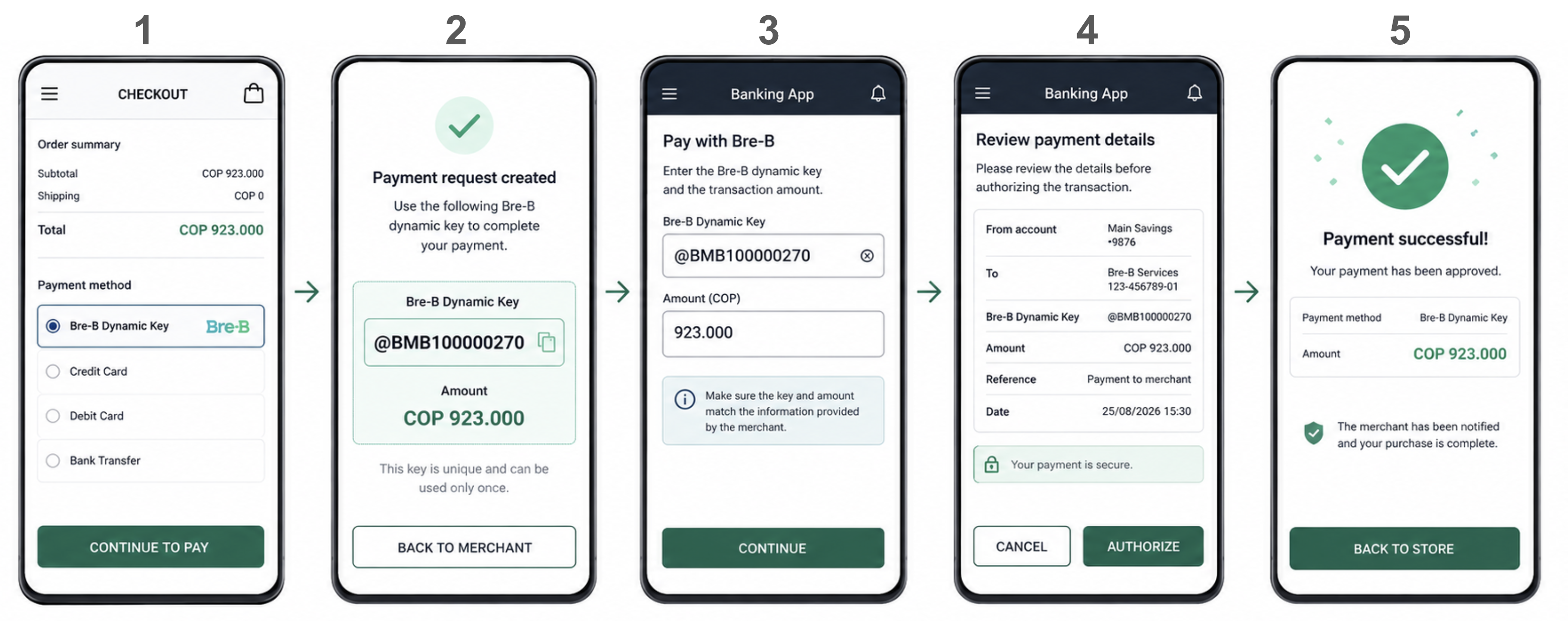
The customer reaches the checkout page and selects Bre-B dynamic key as the preferred payment option.
-
A unique Bre-B dynamic key is generated for the transaction and returned in the payment response.
-
Using their banking application, the customer enters the Bre-B dynamic key together with the transaction amount.
-
The banking application displays the payment details so the customer can review and authorize the transaction.
-
Once the payment is approved, the merchant’s website receives the confirmation and completes the purchase flow.
Request parameters
The following parameters are required specifically for this payment method.
Refer to the Create a Purchase guide for authentication and global fields such as Amount, Currency, and Order.
| Property | Type | Mandatory | Description |
|---|---|---|---|
PaymentMethod | string | Yes | Must be BBK. Refer to the Payment Methods table. |
TargetCountryISO | string | Yes | Country code. Must be CO. |
Customer → Email | string | Yes | Customer’s email address. |
Customer → FirstName | string | No | Customer’s first name. Recommended. |
Customer → LastName | string | No | Customer’s last name. Recommended. |
Customer → DocumentType | string | Yes | Use a valid value from the Document types table |
Customer → DocumentNumber | string | Yes | Customer’s Identification number. Document Types – Colombia. |
Customer → PhoneNumber | string | No | Customer phone number. Recommended. |
MetaDataIn → PaymentExpirationInMinutes | numeric | No | Defines the expiration time for the payment in minutes (max. 10 minutes for Bre-B Dynamic Key flow) |
If
FirstNameLastNameDocumentTypeandDocumentNumberare not included in the purchase request, they must be provided in the refund request.
Request example
To test this endpoint, use the API Reference or the Postman Collection
{
    "PaymentMethod": "BBK",
    "Order": "CH2023-001",
    "TargetCountryISO": "CO",
    "Amount": 923000,
    "Currency": "COP",
    "Description":"Purchase Test",
    "Customer": {
        "Email": "[email protected]",
        "FirstName" : "John",
        "LastName": "Doe",
        "DocumentNumber" : "13394559358",
        "DocumentType": "NIT.CO",
        "PhoneNumber": "+573998764643"
    }
}
Response parameters
The following example shows the response to the request. For additional information about the response structure, refer to the Response parameters section of the Purchase creation guide.
The purchase is created with status PENDING. The unique Bre-B dynamic key for the transaction is returned in theMetadataOut.AliasKey field.
| Property | Type | Description |
|---|---|---|
MetadataOut → AliasKey | string | Unique dynamic key associated with the payment. |
MetadataOut → PaymentCouponUrl | string | Payment coupon URL (Voucher). |
MetadataOut → PaymentExpirationDate | string | Date and time when the Bre-B dynamic key expires. Format: DD/MM/YYYY HH:mm:ss. |
Response example
{
    "TransactionId": "313343841237314912",
    "Result": "COMPLETED",
    "Status": "PENDING",
    "ErrorCode": null,
    "ErrorDescription": null,
    "Created": "2026-05-14T15:56:33.463",
    "AuthorizationDate": "2026-05-14T15:56:45.489",
    "AuthorizationCode": null,
    "Amount": 923000,
    "Currency": "COP",
    "Installments": 1,
    "TaxableAmount": null,
    "Tip": null,
    "Url": "https://api.stage.bamboopayment.com/v3/api/transaction/313343841237314912",
    "MetadataOut": {
        "AliasKey": "@BMB100000270",
        "PaymentCouponUrl": "https://voucher-ui.stage.bamboopayment.com/voucher/322803562482610624",
        "PaymentExpirationDate": "09/06/2026 13:36"
    },
    "Action": null,
    "PaymentMethod": {
        "Brand": "Bre-B Keys",
        "CardOwner": null,
        "Bin": null,
        "IssuerBank": null,
        "Type": "BankTransfer",
        "Expiration": null,
        "Last4": null
    }
}
Updated 5 months ago