

Bamboo 3DS Authentication
Bamboo-managed 3D Secure authentication, available regardless of how you send card data to Bamboo.
Bamboo runs the full 3DS2 process — device fingerprinting, enrollment check, and challenge — on a Bamboo-hosted page, then authorizes the transaction with the acquirer.
This is the Bamboo Authentication method referenced in 3D Secure. If your 3DS provider runs outside Bamboo and you already hold the authentication result (ECI, CAVV, XID), see External Authentication instead.
Who this is for
The same ThreeDSAuthMethod: "INTERNAL" + Redirection mechanism works no matter how your integration reaches Create Purchase:
| Your integration | How you send the card | PCI-DSS required? |
|---|---|---|
| PCI-certified, direct capture | CardData (PAN, CVV, Expiration) | Yes |
| Tokenized via Bamboo's API | TrxToken obtained through the Tokenization API | Yes |
| Tokenized via Bamboo's Tokenization Form | TrxToken obtained through the hosted form | No |
How it's different from External Authentication
Bamboo Authentication (INTERNAL) | External Authentication (EXTERNAL) | |
|---|---|---|
| Who runs 3DS | Bamboo, via its 3DS Server | Your own MPI/3DS Server |
| What you send | Card data or token + a redirect URL | The finished authentication result (Eci, Cavv, Xid, Version, TransactionId) |
| What you build | A redirect + a page to receive the payer back | Nothing extra — you already have the 3DS result before calling Purchase |
Which 3DS Server processes the authentication behind the scenes is Bamboo's decision, not something you configure. The architecture is built to plug in a different 3DS Server per merchant, country, or over time — routed to whichever is most efficient — without any change on your side.
Flow Overview
- You create the purchase with
ThreeDSAuthMethod: "INTERNAL"and aRedirectionobject. - If 3DS applies, the purchase comes back with
Result: "ACTION_REQUIRED"andStatus: "PENDING", plus anAction.URL. The purchase stays inPENDINGfor the entire authentication step — it hasn't been authorized yet. - You redirect the payer to
Action.URL. - Bamboo's hosted page runs the 3DS process through its 3DS Server: device fingerprinting, enrollment check, and challenge if the issuer requires it.
- Bamboo authorizes the transaction with the acquirer using the 3DS result.
- The purchase resolves to its final
Status—APPROVEDorREJECTED— based on both outcomes in sequence: first whether 3DS authentication succeeded, then (only if it did) whether the acquirer approved the authorization. A failed authentication rejects the purchase outright, without ever reaching the acquirer. - The payer is redirected back to the URL you provided in
Redirection. - Bamboo also notifies you via webhook (the same Transaction Notification you already use) with the final purchase + 3DS result — use it as your source of truth, since the redirect alone doesn't guarantee delivery (e.g., the payer closes the browser mid-flow).
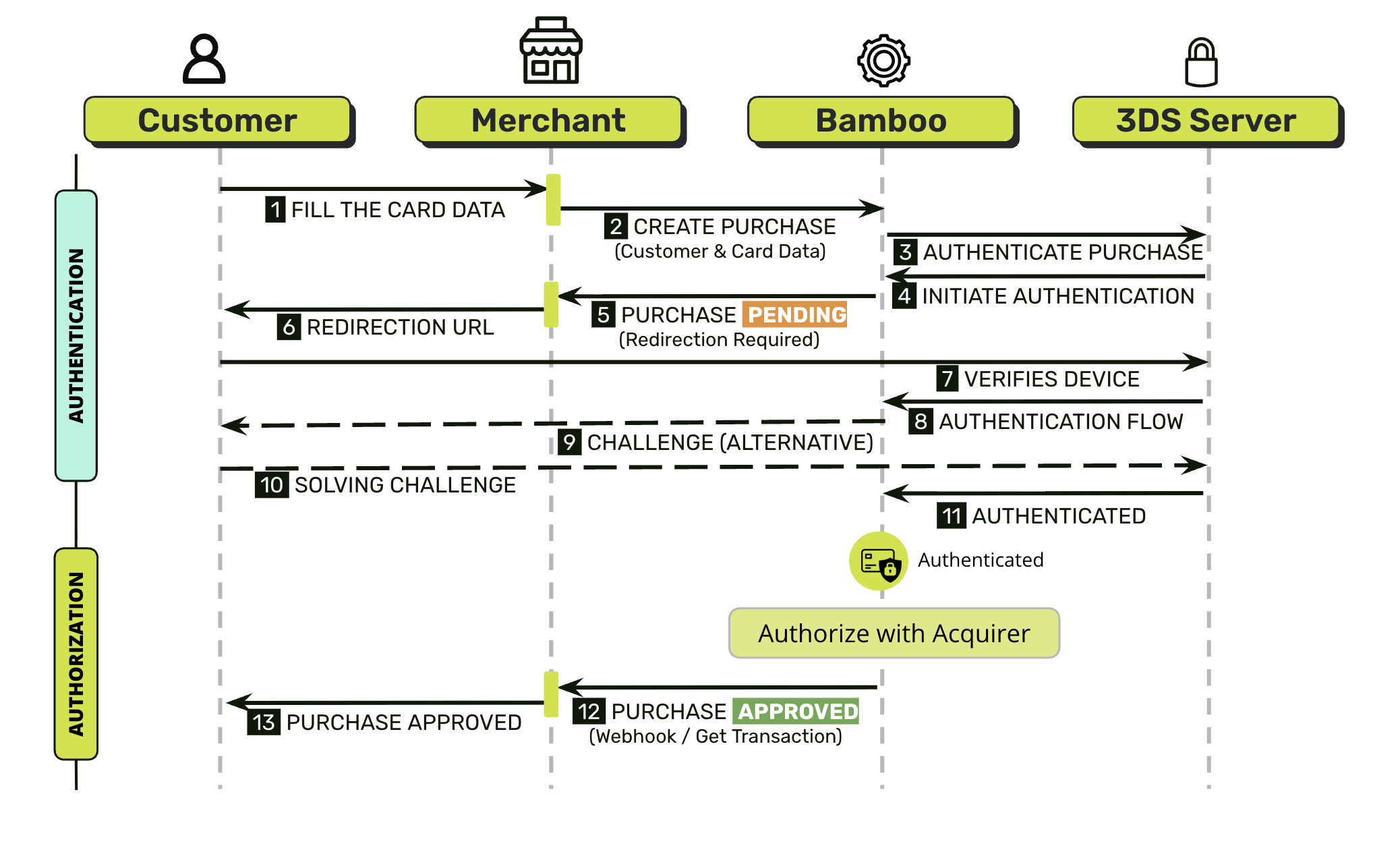
Redirect always happens when 3DS applies — even when the issuer ends up approving the payer without a visible challenge. That step is what lets Bamboo's 3DS Server collect device data from the payer's browser, which feeds the risk-based decision on whether to trigger a challenge at all.
3DS Configuration
Independently of what you send in the request, 3DS behavior is governed by a setting on your merchant account — per card brand and acquirer — with three possible states: Disabled, Mandatory, or Merchant's choice.
Your
ThreeDSAuthMethodflag only has an effect when your account is set to Merchant's choice. If it's Mandatory, every transaction goes through 3DS regardless of what you send. If it's Disabled, don't sendThreeDSAuthMethod: "INTERNAL"— doing so gets the transaction rejected instead of just ignored.
Ask your Bamboo account manager which state applies to your account for each acquirer/country you operate in.
Step 1 — Create the Purchase
Use the regular Create Purchase endpoint with your CardData or TrxToken (whichever matches your integration), plus:
| Property | Type | Mandatory? | Description |
|---|---|---|---|
ThreeDSAuthMethod | string | Yes | Set to "INTERNAL" so Bamboo runs 3DS end-to-end. |
Redirection | object | Yes | Container for the URL(s) used to bring the payer back after 3DS + authorization finish. |
Redirection → url_Response | string | Yes | URL the payer is redirected to once the flow finishes, regardless of the outcome (approved or rejected). |
Customer and billing address fields required for 3DS
When ThreeDSAuthMethod: "INTERNAL" applies to a purchase (or your account has 3DS set to Mandatory), Bamboo's 3DS Server requires a stricter set of Customer fields than a standard, non-3DS purchase. These fields are listed as optional or recommended on the general Create Purchase reference and on some Country Requirements pages, but they are mandatory whenever 3DS authentication runs — the request is rejected before reaching the issuer if they're missing.
Customer field | Mandatory for 3DS? | Format |
|---|---|---|
Customer.Email | Yes | Valid email address |
Customer.FirstName | Yes | Text, not empty |
Customer.LastName | Yes | Text, not empty |
Customer.PhoneNumber | Yes | 7 to 15 digits. May start with +. No spaces, dashes, or parentheses |
Customer.Address (billing address) | Yes | Object, see rows below |
Customer.Address.Country | Yes | ISO 3166-1 2-letter country code, uppercase |
Customer.Address.PostalCode | Yes | 3 to 10 alphanumeric characters. Internal spaces and dashes are allowed; leading/trailing spaces are ignored |
Customer.Address.AddressDetail | Yes | Street and number. Maximum 60 characters |
These fields aren't country-specific — they're required by the 3DS Server itself, so the same rules apply no matter which
TargetCountryISOyou send. If a Country Requirements page marks any of them as optional or recommended, that guidance applies to purchases that don't go through 3DS.
Request Example
{
  "CardData": {
    "CardHolderName": "João Silva",
    "Pan": "4507990000004905",
    "CVV": "123",
    "Expiration": "08/30",
    "Email": "[email protected]"
  },
  "Amount": 100000,
  "Capture": true,
  "Currency": "ARS",
  "Installments": 1,
  "Customer": {
    "Email": "[email protected]",
    "FirstName": "João",
    "LastName": "Silva",
    "PhoneNumber": "11987654321",
    "Address": {
      "Country": "AR",
      "City": "Buenos Aires",
      "State": "C",
      "PostalCode": "11223",
      "AddressDetail": "Avenida Paulista 1000"
    }
  },
  "Order": "CH2023-001",
  "TargetCountryISO": "AR",
  "ThreeDSAuthMethod": "INTERNAL",
  "Redirection": {
    "url_Response": "https://www.merchant-response-page.com"
  }
}
{
"TrxToken": "OT__6dHAgJo6qeg62qIroA7H7_f_NWZZ6IEx4jiYpVJ8SzQ_",
"Amount": 100000,
"Capture": true,
"Currency": "ARS",
"Installments": 1,
"Customer": {
"Email": "[email protected]",
"FirstName": "João",
"LastName": "Silva",
"PhoneNumber": "11987654321",
"Address": {
"Country": "AR",
"City": "Buenos Aires",
"State": "C",
"PostalCode": "11223",
"AddressDetail": "Avenida Paulista 1000"
}
},
"Order": "CH2023-001",
"TargetCountryISO": "AR",
"ThreeDSAuthMethod": "INTERNAL",
"Redirection": {
"url_Response": "https://www.merchant-response-page.com"
}
}
Liability ShiftWhen your account is not set to Mandatory, you can explicitly send
ThreeDSAuthMethod: "DISABLE"to process that transaction without authentication — same outcome as not sending the field at all. By choosing to skip 3DS this way, you assume responsibility for any resulting chargeback on that transaction, since there's no authentication to shift liability to the issuer.
Response — 3DS Required
{
  "TransactionId": "79632697147789184",
  "Result": "ACTION_REQUIRED",
  "Status": "PENDING",
  "ErrorCode": null,
  "ErrorDescription": null,
  "Created": "2026-07-30T21:43:36.440",
  "AuthorizationDate": null,
  "AuthorizationCode": null,
  "Amount": 100000,
  "Currency": "ARS",
  "Installments": 1,
  "Url": "https://api.bamboopayment.com/v3/api/transaction/79632697147789184",
  "MetadataOut": null,
  "Action": {
    "SessionId": "CA_00000000-0000-0000-0000-000000000000",
    "URL": "https://auth-3ds.bamboopayment.com?data=<opaque_base64_payload>",
    "Reason": "AUTHENTICATION_REQUIRED"
  },
  "PaymentMethod": {
    "Brand": "VISA",
    "CardOwner": "João Silva",
    "Bin": "450799",
    "IssuerBank": "Santander",
    "Type": "CreditCard",
    "Expiration": "203008",
    "Last4": "4905"
  },
  "CardOnFile": null
}| Property | Description |
|---|---|
Result: "ACTION_REQUIRED" | 3DS applies — the payer must complete authentication before the purchase resolves. |
Status: "PENDING" | The purchase stays pending until the redirect flow finishes. |
Action.Reason: "AUTHENTICATION_REQUIRED" | Confirms the pending action is 3DS (as opposed to other ACTION_REQUIRED cases your integration may already handle, e.g. VERIFICATION_CODE_NEEDED). |
Action.URL | The Bamboo-hosted URL to redirect the payer to. Treat it as opaque — don't parse or modify it. |
Action.SessionId | Session identifier for the action; useful for support/troubleshooting. |
If 3DS doesn't apply, the purchase resolves directly as
Result: "COMPLETED"withStatus: "APPROVED"/"REJECTED"— same as any other purchase.
Step 2 — Redirect the payer
Redirect the payer to Action.URL. This redirect always happens once 3DS applies — regardless of whether the issuer ends up showing a challenge — because it's how Bamboo's hosted page collects the device data needed to decide whether a challenge is required at all. From there, Bamboo's hosted page:
- Loads and collects device fingerprint data.
- Runs the enrollment check through Bamboo's 3DS Server.
- Shows the issuer's challenge screen if required.
- Completes the pending purchase and authorizes it with the acquirer.
- Redirects the payer back to your
url_Response.
There's no widget or SDK to embed on your side — this is the main difference vs. integrating your own 3DS Server.
Don't render a final result on
url_Responsebased on the redirect alone. The redirect confirms the payer came back, but the purchase may still be resolving server-side (authorization with the acquirer happens as part of completing the 3DS flow). Yoururl_Responsepage should show a neutral/processing state and confirm the actual outcome using the webhook (or aGET Transactioncall) before telling the payer whether the payment was approved or rejected — see Step 3.
Step 3 — Get the result
Once the purchase resolves, Bamboo sends the standard Transaction Notification webhook, and the same data is available via GET Transaction. Both now include a ThreeDS object with the authentication result:
| Property | Type | Description |
|---|---|---|
ThreeDS → Status | string | AUTHENTICATED or FAILED. |
ThreeDS → Reason | string | Only present when Status is FAILED. One of CHALLENGE_FAILED, REJECTED. |
ThreeDS → Flow | string | FRICTIONLESS or CHALLENGE. |
ThreeDS → Xid | string | Transaction identifier from the 3DS provider. |
ThreeDS → Eci | string | Electronic Commerce Indicator returned by the issuer/network. |
ThreeDS → Cavv | string | Cardholder Authentication Verification Value. |
ThreeDS → Version | string | 3DS protocol version (e.g. 2.2.0). |
ThreeDS → TransactionId | string | 3DS transaction ID — keep it for dispute/chargeback evidence. |
If authentication fails (
ThreeDS.Status: "FAILED"), the purchase itself is rejected and is not sent for authorization — there's no liability shift, so the card is not charged.
Error Codes
3DS-specific errors follow the same TR family used across Bamboo:
| Code | Description |
|---|---|
TR075 | 3DSecure validation required. |
TR076 | 3DSecure authentication failed. |
The codes below are specific to the Bamboo Authentication flow and are still being incorporated into the public Error Codes page — sharing them here so you're not blocked, but confirm with your account manager before relying on exact wording in production error handling.
| Code | Description |
|---|---|
TR040 | Invalid customer email. |
TR041 | Invalid 3DS authentication token. |
TR042 | 3DS authentication was already processed. |
TR043 | 3DS authentication doesn't apply for this transaction (card brand not enrolled, amount below threshold, or 3DS disabled for your account). |
TR044 | The requested 3DS authentication wasn't found (expired or invalid ID) — start a new authentication. |
TR045 | Invalid 3DS service type. This is an internal routing value — not something you set — and today only one 3DS Server is configured, so this error shouldn't surface in normal use. |
Prerequisites
- PCI-DSS compliance: only required if you send card data directly through
CardData. If you integrate withTrxToken(via the tokenization API or the hosted Tokenization Form), this doesn't apply to you. (Confirm the specific SAQ/level required for theCardDatapath with your Bamboo account manager.) - 3DS enabled on your merchant account: ask your Bamboo account manager to enable 3DS for the acquirer(s)/country(ies) you operate in — otherwise transactions resolve without 3DS (
TR043). Redirection.url_Responsereachable and stable: it must be a URL the payer's browser can reach directly (notlocalhost, not behind auth walls).- Webhook endpoint configured: to receive the final
ThreeDS+ purchase result — see Transaction Notification.
Next Steps
Concepts: 3DS Server, Directory Server, ACS, and why 3DS matters.
Full reference for the Purchase v3 endpoint.
Submit ECI, CAVV, XID, and version from your own MPI/3DS Server instead of Bamboo's.
Configure and validate the webhook that receives the final purchase + 3DS result.
Updated 2 months ago