

3DS with Tokenization Form
3D Secure integration using Bamboo’s Tokenization Form. Learn required fields, initialization flow, authentication steps, and how to include 3DS data in the purchase request.
Deprecation NoticeThis authentication flow is deprecated and will be discontinued. If you are starting a new integration, please do not use this method.
We strongly recommend implementing our new Bamboo 3DS Authentication flow. It handles authentication during the Purchase process, providing a seamless, frictionless experience.
Bamboo provides a Bamboo-managed 3DS flow through the Tokenization Form, where Bamboo executes the full 3DS2 process, including frictionless and challenge flows.
This method requires no PCI scope. Card data is captured securely by Bamboo.
Flow Overview
The 3DS flow handled by Bamboo’s Tokenization Form consists of 17 steps, grouped into the following four stages:
- 3DS Initialization
- Tokenization
- 3DS Authentication
- Purchase Authorization
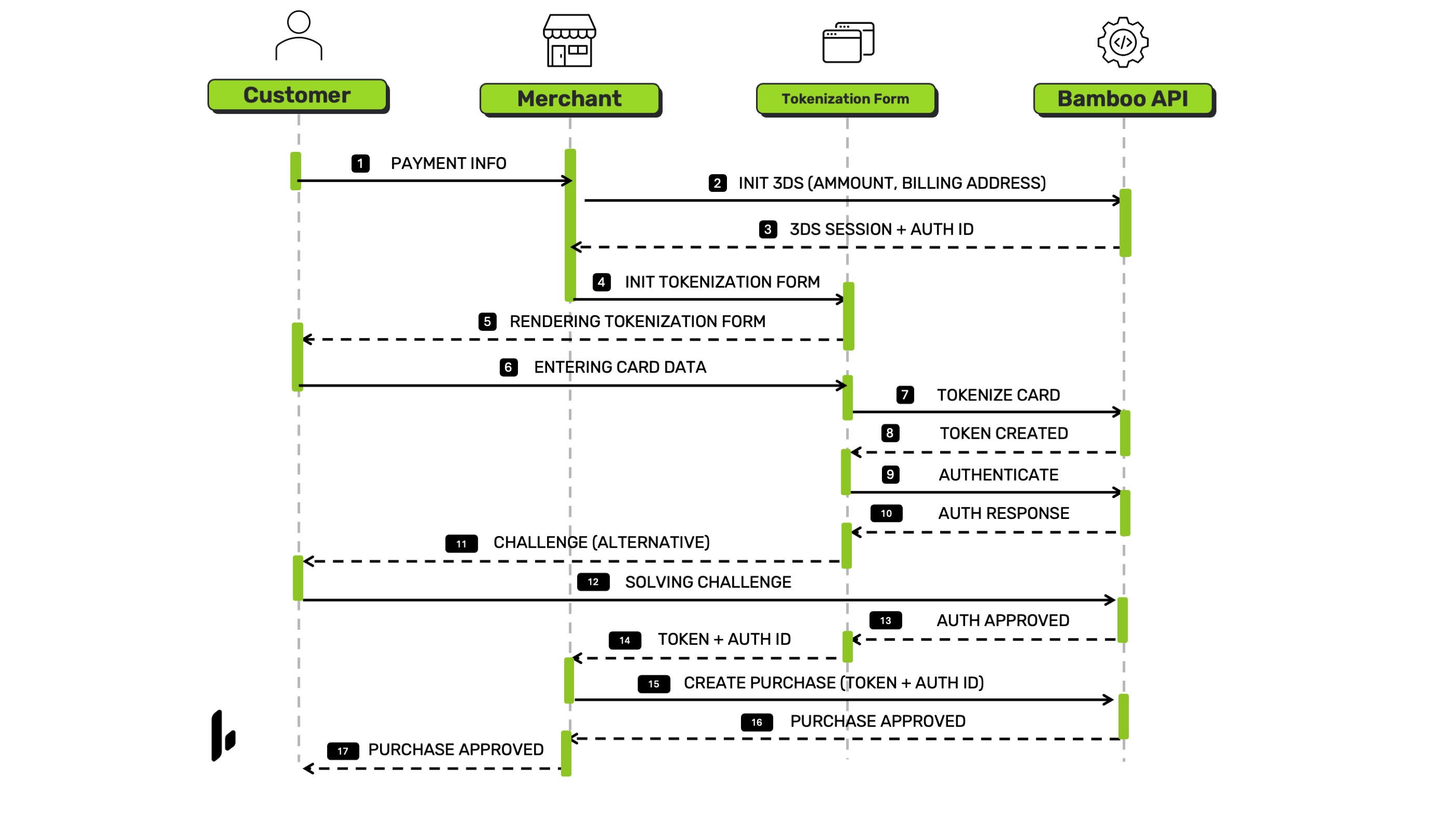
3DS Initialization
- Merchant prepares payment info
- 3DS session is initialized using amount and billing address.
- Bamboo returns
AuthenticationIdto bind the session to the Tokenization Form.
Tokenization
- Merchant loads the Tokenization Form
- Form is displayed to the payer.
- Payer enters card data
- Bamboo tokenizes the card
- Card token is generated
3DS Authentication
- Bamboo initiates 3DS authentication
- Issuer evaluates the transaction
- Challenge shown if required
- Payer completes the challenge
- Authentication approved
- Form returns
Token+Auth3DSIdto the merchant
Purchase Authorization
- Merchant creates the purchase including
TrxTokenandAuth3DSId - Bamboo processes the authorization with the acquirer
- Purchase result is returned
3DS Initialization
When using the Tokenization Form, Bamboo requires specific fields to initialize the 3DS session. These parameters are evaluated by the issuer during risk-based authentication and must always be provided.
Required Parameters
| Property | Type | Mandatory? | Description |
|---|---|---|---|
Amount | int64 | Yes | Total purchase amount used for issuer risk evaluation. |
Currency | string | Yes | Currency of the transaction. |
Customer → Email | string | Yes | Cardholder email required for 3DS authentication. |
Customer → FirstName | string | Yes | Cardholder first name. |
Customer → LastName | string | Yes | Cardholder last name. |
Customer → BillingAddress | object | Yes | Full billing address of the cardholder. All fields below are required. |
BillingAddress object (all fields required)
| Property | Type | Mandatory? | Description |
|---|---|---|---|
Customer → BillingAddress → Country | string | Yes | ISO 3166-1 alpha-2 country code. |
Customer → BillingAddress → PostalCode | string | Yes | ZIP or postal code. |
Customer → BillingAddress → AddressDetail | string | Yes | Street name and number. |
Customer → BillingAddress → Locality | string | No | City or locality. |
Request Example
Test this endpoint in the API Reference
{
    "Currency": "USD",
    "Amount": "160",
    "Customer": {
        "Email": "[email protected]",
        "FirstName": "Juan Felipe",
        "LastName": "García",
        "PhoneNumber": "+59899999999",
        "BillingAddress": {
            "Country": "UY",
            "PostalCode": "11100",
            "AddressDetail": "Sarmiento 1234",
            "AdministrativeArea": "Montevideo"
        }
    }
}
Response
| Property | Type | Description |
|---|---|---|
AuthenticationId | string | Unique identifier of the 3DS authentication session. |
AuthenticationToken | string | Token used to bind the 3DS session to the form flow. |
Example Response
{
    "AuthenticationId": "503a4368-8f39-4b28-a17f-8a5dd2afb90d",
    "AuthenticationToken": "eyJhbGciOiJIUzI1NiIsInR5cCI6IkpXVCJ9.eyJhdXRoZW50aWNhdGlvbklkIjoiNTAzYTQzNjgtOGYzOS00YjI4LWExN2YtOGE1ZGQyYWZiOTBkIiwic2VydmljZVR5cGUiOiJjeWJlcnNvdXJjZSIsImlhdCI6MTc2NDYwOTEyOH0.jwH-F-Vt6ukBFwEDPZ3V7nKf1cI1upnZQyHbnHNx3eA"
}
Loading the Tokenization Form with 3DS
After initializing 3DS, the AuthenticationToken returned by the 3DS Initialize endpoint must be passed to the Tokenization Form configuration.
The token is sent inside metadata.authenticationToken in the options object used to load the form.
Form Initialization with AuthenticationToken
const options = {
  metadata: {
    publicKey: publicKey,
    targetCountryISO: document.getElementById("countryId").value,
    customer: {
      uniqueId: document.getElementById("uniqueId").value,
      email: email,
      cardOwnerName: cardOwnerName
    },
    logoUrl: logoUrl,
    locale: document.getElementById("langId").value,
    authenticationToken: "eyJhbGciOiJIUzI1NiIsInR5cCI6IkpXVCJ9.eyJhdXRoZW50aWNhdGlvbklkIjoiNTAzYTQzNjgtOGYzOS00YjI4LWExN2YtOGE1ZGQyYWZiOTBkIiwic2VydmljZVR5cGUiOiJjeWJlcnNvdXJjZSIsImlhdCI6MTc2NDYwOTEyOH0.jwH-F-Vt6ukBFwEDPZ3V7nKf1cI1upnZQyHbnHNx3eA"
  },
  hooks: hooks,
  containerId: getContainerId()
};
The authenticationToken value must match the AuthenticationToken returned by the 3DS Initialize response. This binds the Tokenization Form session to the previously created 3DS authentication context.
Note:
The Tokenization Form returns the same structure shown on this page (the cardToken).
For the purchase request, theTokenmust be sent asTrxToken, and theAuthenticationTokenmust be sent inside theThreeDSobject asThreeDSId.
These values must match the identifiers returned during the 3DS initialization and Tokenization Form steps, so the acquirer can validate the authentication associated with the transaction.
3DS Fields Required in the Purchase Request
When the 3DS flow is handled through the Tokenization Form, Bamboo returns two values:
- the card
Token, and - the
AuthenticationTokenreturned from the 3DS initialization step.
Both values must be included in the purchase request
Required Parameters
| Property | Type | Mandatory? | Description |
|---|---|---|---|
TrxToken | string | Yes | Card token returned by the Tokenization Form. Must be sent in all purchases. |
ThreeDSAuthMethod | string | Yes | Must be set to "INTERNAL" when using Bamboo’s Tokenization Form. |
ThreeDS | object | Yes | Container for 3DS data returned during initialization. |
ThreeDS → ThreeDSId | string | Yes | The AuthenticationId returned from the 3DS initialization step. |
Example (Purchase Request)
{
  "TrxToken": "OT__6dHAgJo6qeg62qIroA7H7_f_NWZZ6IEx4jiYpVJ8SzQ_",
  "UniqueID": "paymentID3022",
  "Capture": true,
  "TargetCountryISO": "BR",
  "Currency": "BRL",
  "Amount": 25000,
  "Installments": 2,
  "Order": "CH2023-001",
  "Description": "Compra de teste",

  "Customer": {
    "FirstName": "João",
    "LastName": "Silva",
    "ReferenceCode": "JS-001",
    "PhoneNumber": "11987654321",
    "DocumentNumber": "12345678901",
    "DocumentType": "CPF.BR",
    "Email": "[email protected]",
    "Address": {
      "Country": "BR",
      "City": "São Paulo",
      "State": "SP",
      "PostalCode": "01310-200",
      "AddressDetail": "Avenida Paulista 1000"
    }
  },

  "CustomerIP": "190.10.224.231",
  "AntifraudData": {
    "AntifraudFingerprintId": "0046f17b-197a-4d63-8b6b-6082cdd557ff"
  },
  "ThreeDSAuthMethod": "INTERNAL",
  "ThreeDS": {
    "ThreeDSId": "962b91dd-59d9-427c-951d-245eb9561c1a"
  }
}
Next Steps
Initialize the 3DS session and retrieve the AuthenticationId.
Complete the purchase using TrxToken and Auth3DSId.
Capture card data securely and receive 3DS authentication values.
Submit ECI, CAVV, XID, and version from an external 3DS provider.
Updated about 2 months ago