

Bank Transfers
Accept bank transfers in Uruguay through Bamboo’s gateway model.
Learn required parameters, the homebanking redirect flow, and how Bamboo tracks and confirms the payment status.
This page describes Uruguay-specific requirements for processing bank transfer payments under the Gateway model. Bank Transfers allow your customers to pay directly from their bank account through an online banking redirect flow.
Payment Flow
The following steps describe the customer experience when completing a Sistarbanc SPE bank transfer payment in Uruguay.
The process may vary slightly depending on the bank's interface.
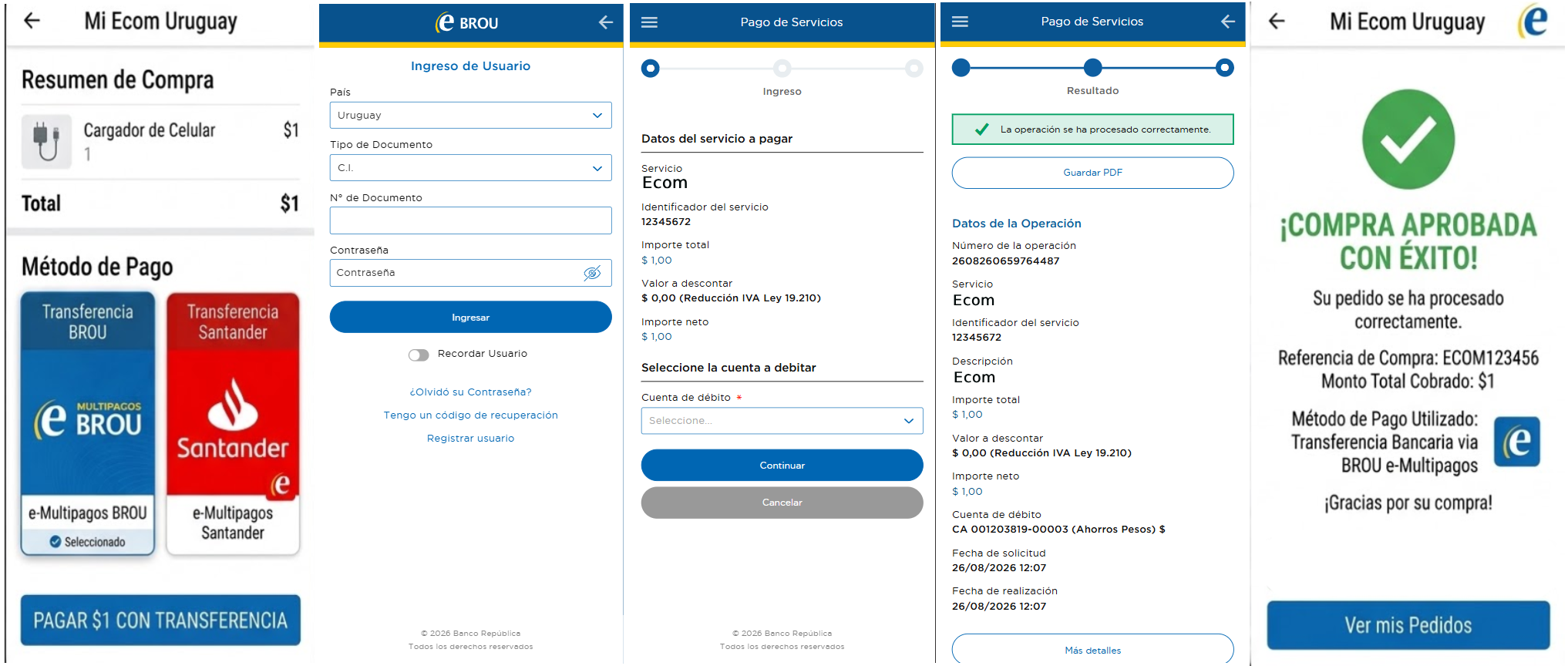
-
Payment method selection:
The customer selects bank transfer as the payment method and chooses their bank. The merchant sends the payment request to Bamboo including the selected bank asPaymentMethodand, if applicable, aPaymentExpirationInMinutesto set a time limit for the customer to complete the payment. -
Redirect to homebanking:
The customer is redirected to the homebanking of their selected bank, where they log in with their banking credentials. -
Payment authorization:
The customer reviews the transaction details — amount, currency, and reference — and confirms the payment using their usual authorization method (token, PIN, or mobile key). -
Payment resolution:
The bank processes the transfer. Sistarbanc notifies Bamboo with the result, and the customer is redirected back to the merchant via the redirect URL according to the transaction status. -
Merchant notification:
Bamboo notifies the merchant with the final transaction status via webhook, allowing the merchant to update the order accordingly. IfPaymentExpirationInMinuteswas set and the customer did not complete the payment within the time limit, the transaction is marked asCanceled.
The purchase status remains PENDING until Sistarbanc confirms the transfer. If no webhook is received, Bamboo automatically queries the transaction status. If
PaymentExpirationInMinutesis set and the customer does not complete the payment in time, the transaction is marked as Canceled.
Request parameters
Include the following fields for this payment method to work correctly.
For global parameters (Amount, Currency, Order, etc.), see the Create Purchase guide.
| Property | Type | Mandatory? | Description |
|---|---|---|---|
PaymentMethod | string | Yes | Send the bank transfer payment method identifier listed in the Uruguay payment methods documentation. |
TargetCountryISO | string | Yes | Must be "UY". Indicates the destination country. |
Description | string | Yes | Description of the purchase. Required for this payment method. |
Customer → Email | string | Yes | Customer's email address. |
Customer → FirstName | string | No | Customer's first name. |
Customer → LastName | string | No | Customer's last name. |
Customer → DocumentType | string | No | Customer's document type. Refer to the Document types table. |
Customer → DocumentNumber | string | No | Customer's document number. |
Customer → PhoneNumber | string | No | Customer's phone number. |
Customer → Address → Country | string | No | Customer's country. |
Customer → Address → State | string | No | Customer's state or department. |
Customer → Address → City | string | No | Customer's city. |
Customer → Address → AddressDetail | string | No | Customer's address detail (street, number, complement). |
Customer → Address → PostalCode | string | No | Customer's postal code. |
MetaDataIn → PaymentExpirationInMinutes | numeric | No | Expiration time for the transfer in minutes. If not provided, the transaction has no expiration and its status is queried daily. If provided, Bamboo queries the status at expiration time and marks the transaction as Canceled if no payment is confirmed. |
Redirection → Url_Approved | string | No | URL to redirect the customer after an approved transaction. |
Redirection → Url_Rejected | string | No | URL to redirect the customer after a rejected transaction. |
Redirection → Url_Canceled | string | No | URL to redirect the customer after a canceled transaction. |
Request example
To test this endpoint, use the API Reference or the Postman Collection
{
  "PaymentMethod": "BRO",
  "Order": "UY-BANK-1001",
  "Amount": 1000,
  "Description": "Compra en línea - Transferencia bancaria",
  "Currency": "UYU",
  "TargetCountryISO": "UY",
  "Customer": {
    "Email": "[email protected]",
    "FirstName": "Luis",
    "LastName": "Martinez",
    "DocumentNumber": "12345672",
    "DocumentType": "CI.UY",
    "PhoneNumber": "24022330",
    "Address": {
      "Country": "UY",
      "State": "Montevideo",
      "City": "Montevideo",
      "AddressDetail": "Av. Sarmiento 22",
      "PostalCode": "15000"
    }
  },
  "MetaDataIn": {
    "PaymentExpirationInMinutes": 60
  },
  "Redirection": {
    "Url_Approved": "https://merchant.com/checkout/approved",
    "Url_Rejected": "https://merchant.com/checkout/rejected",
    "Url_Canceled": "https://merchant.com/checkout/canceled"
  }
}
Response parameters
The API returns the purchase with the status PENDING and includes an Action object containing the URL where the customer must complete the transfer.
| Property | Type | Description |
|---|---|---|
Action → SessionId | string | Session identifier generated for the redirection process. |
Action → URL | string | URL where the payer must log into their banking app and complete the transfer. |
Action → Reason | string | Reason code. Always REDIRECTION_NEEDED_EXTERNAL_SERVICE. |
The
Brandfield reflects the bank selected by the customer (e.g.,"E-Brou","Santander","BBVA"). The value varies depending on the bank chosen at checkout.
Response example
The API returns the purchase with the status PENDING and includes an Action object containing the URL where the customer must complete the transfer.
{
  "TransactionId": "135845766093616960",
  "Result": "ACTION_REQUIRED",
  "Status": "PENDING",
  "ErrorCode": null,
  "ErrorDescription": null,
  "Created": "2026-08-01T20:42:34.562",
  "AuthorizationDate": null,
  "AuthorizationCode": null,
  "Amount": 4365,
  "Currency": "UYU",
  "Installments": 1,
  "TaxableAmount": null,
  "Tip": null,
  "Url": "https://api.stage.bamboopayment.com/Purchase/135845766093616960",
  "MetadataOut": null,
  "Action": {
    "SessionId": "CA_14d2639f-6b0a-41a5-af4f-07e619955d9a",
    "URL": "https://redirect.stage.bamboopayment.com/CA_14d2639f-6b0a-41a5-af4f-07e619955d9a",
    "Reason": "REDIRECTION_NEEDED_EXTERNAL_SERVICE"
  },
  "PaymentMethod": {
    "Brand": "E-Brou",
    "CardOwner": null,
    "Bin": null,
    "IssuerBank": null,
    "Type": "BankTransfer",
    "Expiration": null,
    "Last4": null
  }
}
Discover the API
Learn more about how to create and manage cash-based transactions in Uruguay:
Updated 3 days ago