
Yape
Yape OTP
Learn how to send the customer’s phone number and authorization code (OTP) to process real-time approvals or rejections.
Yape is a mobile payment method in Peru that allows purchases to be authorized using a phone number and a one-time authorization code (OTP) generated by the payer in the Yape app. The transaction is processed immediately and returns an Approved or Rejected status in real time.
Payment flow
The following diagram illustrates the payment process for Yape OTP.
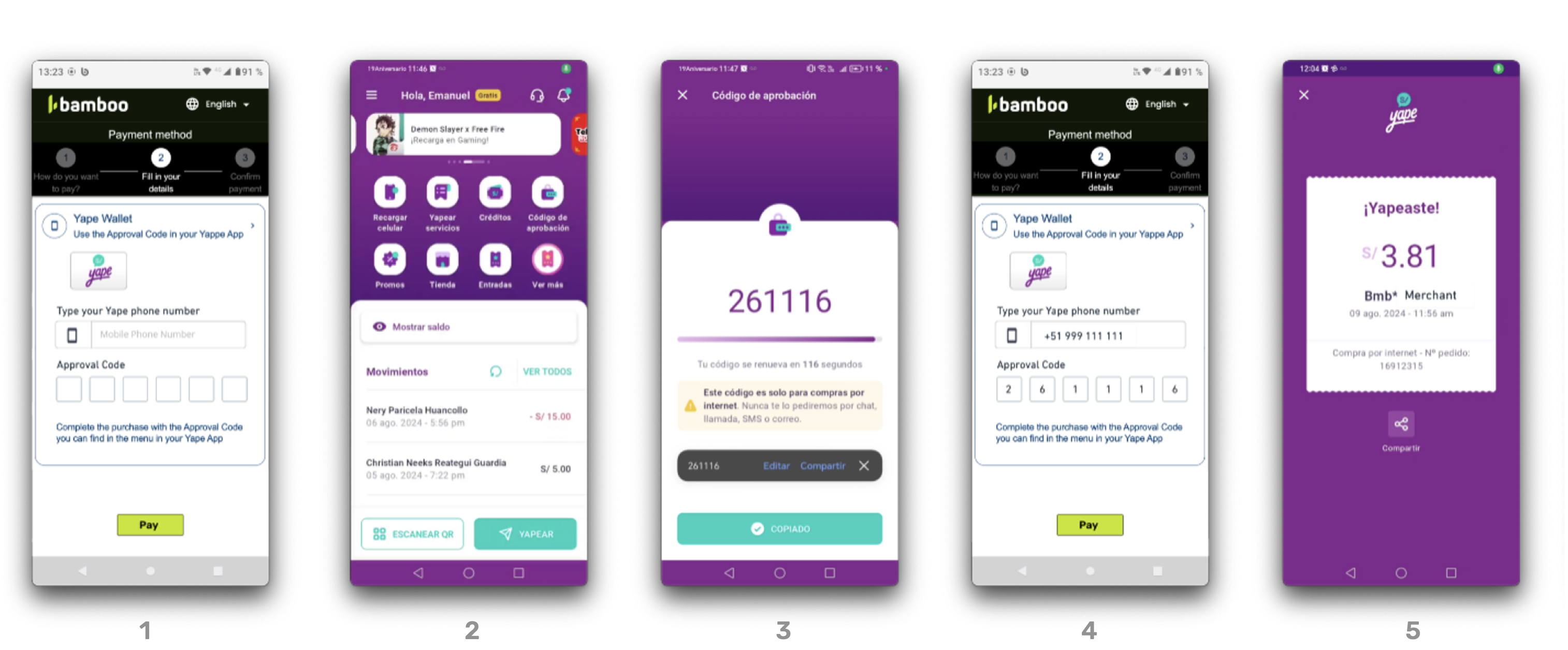
- The customer selects Yape as the payment method.
- The merchant displays a form requesting the mobile phone number and authorization code.
- The customer opens the Yape app and generates an authorization code (OTP).
- The customer enters the phone number and OTP in the merchant’s checkout form.
- Bamboo processes the transaction and immediately returns an Approved or Rejected status.
Request parameters
The following parameters are required specifically for this payment method.
Refer to the Create a Purchase guide for authentication and global fields such as Amount, Currency, and Order.
| Property | Type | Description |
|---|---|---|
PaymentMethod | string | Must be YAP. Refer to the Payment Methods table. Required. |
TargetCountryISO | string | Must be PE. Indicates the destination country. Required. |
Customer → Email | string | Customer’s email address. Required. |
Customer → FirstName | string | Customer’s first name. Recommended. |
Customer → LastName | string | Customer’s last name. Recommended. |
Customer → DocumentType | string | Use a valid value from the Document types table. Optional. |
Customer → DocumentNumber | string | Identification number according to the selected document type. Optional. |
Customer → PhoneNumber | string | Customer’s registered phone number in Yape. Maximum 9 digits. Recommended. |
MetaDataIn → phoneNumber | string | Mobile phone number associated with the Yape account. Required. |
MetaDataIn → otp | string | Authorization code generated by the Yape app. Required. |
MetaDataIn → PaymentExpirationInMinutes | number | Validity period of the payment request in minutes. Optional. |
The
otp(authorization code) is generated by the customer in the Yape app and must be entered along with the phone number during checkout.
Bamboo validates both fields to authorize the transaction.
Request example
To test this endpoint, use the API Reference or the Postman Collection
{
  "PaymentMethod": "YAP",
  "Order": "PE-YAPE-0001",
  "Amount": 100,
  "Currency": "PEN",
  "Description": "Pago con Yape - prueba",
  "TargetCountryISO": "PE",
  "Customer": {
    "FirstName": "Lucía",
    "LastName": "Fernández",
    "Email": "[email protected]",
    "PhoneNumber": "987654321",
    "DocumentType": "DNI.PE",
    "DocumentNumber": "12345678",
    "ReferenceCode": "PE-REF-001",
    "Address": {
      "Country": "PE",
      "City": "Lima",
      "State": "Lima",
      "PostalCode": "15046",
      "AddressDetail": "Av. Arequipa 1234, Miraflores"
    }
  },
  "MetaDataIn": {
    "PaymentExpirationInMinutes": 1440,
    "phoneNumber": "987654321",
    "otp": "261116"
  }
}
Response parameters
The API response returns the payment voucher information (QR code and payment key) required for the customer to complete the payment. The transaction is initially created with `PENDING status. The final payment result is notified asynchronously through webhook notifications. For more details on the full response object, refer to the Response parameters section of the Purchase creation guide.
| Property | Type | Description |
|---|---|---|
TransactionId | string | Unique identifier for the transaction in Bamboo. |
Result | string | Result of the operation (COMPLETED, REJECTED). |
Status | string | Final status of the payment (APPROVED, REJECTED). |
AuthorizationCode | string | Code returned by the acquirer confirming the authorization. |
MetadataIn → phoneNumber | string | Mobile phone number used for the Yape payment. |
MetadataIn → otp | string | Authorization code provided by the payer through the Yape app. |
Response example
{
  "TransactionId": "79632697147789184",
  "Result": "COMPLETED",
  "Status": "APPROVED",
  "ErrorCode": null,
  "ErrorDescription": null,
  "Created": "2024-08-07T17:51:54.620",
  "AuthorizationDate": "2024-08-07T17:51:56.879",
  "AuthorizationCode": "839936",
  "Amount": 25000,
  "Currency": "PEN",
  "Installments": 1,
  "Url": "https://api.stage.bamboopayment.com/Purchase/79632697147789184",
  "MetadataIn": {
    "PaymentExpirationInMinutes": "1440",
    "phoneNumber": "987654321",
    "otp": "261116"
  },
  "Action": null,
  "PaymentMethod": {
    "Brand": "Yape",
    "CardOwner": null,
    "Bin": null,
    "IssuerBank": null,
    "Type": "BankTransfer",
    "Expiration": null,
    "Last4": null
  }
}
Yape One shot
This payment method is an asynchronous Yape payment flow where the payer approves the payment directly in the Yape app.
Unlike the existing OTP payment method, this flow uses a redirect/app approval experience and transaction confirmation is received asynchronously through webhook notifications.
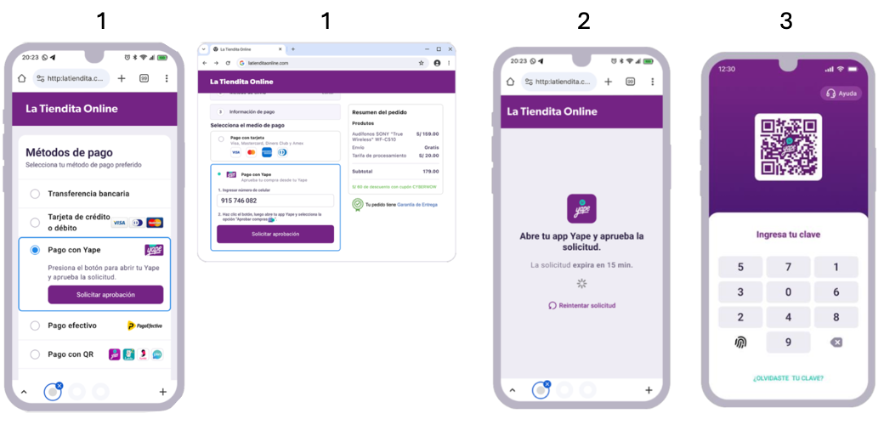
Payment Flow - Mobile and Desktop Flows
-
In the mobile flow, the user selects “Pay with Yape” and taps the button to automatically open the application.
In the desktop flow, the user selects “Pay with Yape”, enters their phone number, and clicks “Request approval”.
-
In the desktop flow while waiting, the merchant’s website remains on hold.
-
From this step on, both flows are the same. The user opens the Yape app using their 6-digit password.
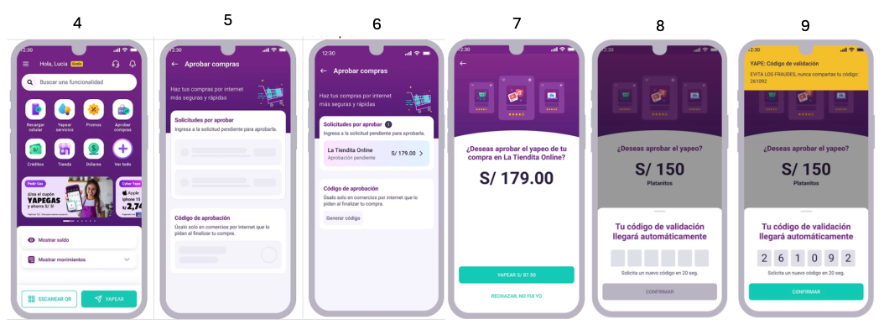
-
The user accesses their Yape account.
-
The user selects the “Approve purchases” option from the main menu.
-
The user looks for the request using the merchant name and the correct amount, then selects it.
-
The user reviews the details and taps the “Yapear” button.
-
The user receives a validation code (OTP) through a notification, which is automatically completed on the screen.
-
The customer confirms the purchase.
Status Notification
If customer does not approve in more than 15 minutes, merchant should receive a cancelled status (due to Yape notification expiration time).
Request parameters
The following parameters are required specifically for this payment method.
Refer to the Create a Purchase guide for authentication and global fields such as Amount, Currency, and Order.
| Property | Type | Description |
|---|---|---|
PaymentMethod | string | Must be YOS. Refer to the Payment Methods table. Required. |
TargetCountryISO | string | Must be PE. Indicates the destination country. Required. |
Customer → Email | string | Customer’s email address. Required. |
Customer → FirstName | string | Customer’s first name. Recommended. |
Customer → LastName | string | Customer’s last name. Recommended. |
Customer → DocumentType | string | Use a valid value from the Document types table. Optional. |
Customer → DocumentNumber | string | Identification number according to the selected document type. Optional. |
Customer → PhoneNumber | string | Customer’s registered phone number in Yape. Maximum 9 digits. Recommended. |
MetaDataIn → deviceType | string | Device from which the user creates the transaction. Must be MOBILE or DESKTOP Required. |
MetaDataIn → phoneNumber | string | Mobile phone number associated with the Yape account. Conditional. Required for deviceType = DESKTOP |
Request example - MOBILE
To test this endpoint, use the API Reference or the Postman Collection
{
  "PaymentMethod": "YOS",
  "Order": "PE-YAPE-0001",
  "Amount": 1500,
  "Currency": "PEN",
  "Description": "Pago con Yape",
  "TargetCountryISO": "PE",
  "Customer": {
    "FirstName": "Lucía",
    "LastName": "Fernández",
    "Email": "[email protected]",
    "PhoneNumber": "987654321",
    "DocumentType": "DNI.PE",
    "DocumentNumber": "12345678",
    "ReferenceCode": "PE-REF-001"
  },
  "MetaDataIn": {
    "deviceType": "MOBILE"
  }
}
{
"PaymentMethod": "YOS",
"Order": "PE-YAPE-0001",
"Amount": 1500,
"Currency": "PEN",
"Description": "Pago con Yape",
"TargetCountryISO": "PE",
"Customer": {
"FirstName": "Lucía",
"LastName": "Fernández",
"Email": "[email protected]",
"PhoneNumber": "987654321",
"DocumentType": "DNI.PE",
"DocumentNumber": "12345678",
"ReferenceCode": "PE-REF-001"
},
"MetaDataIn": {
"deviceType" : "DESKTOP",
"phoneNumber" : "987654321"
}
}Response parameters
The API response confirms that the payment request was successfully created. The transaction is initially created with PENDING status while the customer authorizes the payment in the Yape application. The final payment result is notified asynchronously through webhook notifications. For more details on the full response object, refer to the Response parameters section of the Purchase creation guide.
For MOBILE flow, the MetadataOut field contains a Deep Link so the the customer is directed to Yape App.
| Property | Type | Description |
|---|---|---|
TransactionId | string | Unique identifier for the transaction in Bamboo. |
Result | string | Result of the operation (COMPLETED, REJECTED). |
Status | string | Status of the payment (PENDING, REJECTED). |
Response example
{
  "TransactionId": "313024442265583456",
  "Result": "COMPLETED",
  "Status": "PENDING",
  "ErrorCode": null,
  "ErrorDescription": null,
  "Created": "2026-05-13T18:47:22.812",
  "AuthorizationDate": "2026-05-13T18:47:24.131",
  "AuthorizationCode": null,
  "Amount": 1500,
  "Currency": "PEN",
  "Installments": 1,
  "TaxableAmount": null,
  "Tip": null,
  "Url": "https://api.dev.bamboopayment.com/v3/api/transaction/313024442265583456",
  "MetadataOut": {
  	"deepLink" : "yape://payment?token=dummy-deeplink-token"
  },
  "Action": null,
  "PaymentMethod": {
    "Brand": "Yape OneShot",
    "CardOwner": null,
    "Bin": null,
    "IssuerBank": null,
    "Type": "BankTransfer",
    "Expiration": null,
    "Last4": null
  },
  "CardOnFile": null
}
{
"TransactionId": "313024442265583456",
"Result": "COMPLETED",
"Status": "PENDING",
"ErrorCode": null,
"ErrorDescription": null,
"Created": "2026-05-13T18:47:22.812",
"AuthorizationDate": "2026-05-13T18:47:24.131",
"AuthorizationCode": null,
"Amount": 1500,
"Currency": "PEN",
"Installments": 1,
"TaxableAmount": null,
"Tip": null,
"Url": "https://api.dev.bamboopayment.com/v3/api/transaction/313024442265583456",
"MetadataOut": {},
"Action": null,
"PaymentMethod": {
"Brand": "Yape OneShot",
"CardOwner": null,
"Bin": null,
"IssuerBank": null,
"Type": "BankTransfer",
"Expiration": null,
"Last4": null
},
"CardOnFile": null
}{
"TransactionId": 379245,
"TransactionType": "Purchase",
"TransactionStatusId": 4,
"Status": "Rejected",
"ErrorCode": "TR301",
"Amount": 5000,
"Currency": "PEN",
"Installments": "1",
"UniqueId": "",
"Order": "1",
"Description": "Description",
"UrlNotify": "https://dummystore.com/checkout/notifications",
"TargetCountryIso": "PE",
"Created": "2024-02-07T18:10:45.667",
"MetadataOut": { },
"Customer": {
"CustomerId": 321559,
"Email": "[email protected]",
"DocumentTypeId": 1,
"DocNumber": "52960268",
"LastName": "Perez",
"FirstName": "Maria"
},
"PaymentMedia": {
"PaymentMediaId": 547,
"Brand": "Yape OneShot",
"PaymentMediaType": "Bank Transfer",
}
}