---
updatedAt: 2026-08-31T21:43:58.000Z
agentTools:
projectIndex: https://docs.bamboopayment.com/llms.txt
---
# Plin
Accept asynchronous Plin account-to-account payments in Peru through Bamboo Payments API v3.
Accept Plin payments in Peru by creating an asynchronous Purchase that the customer authorizes in their banking app.
Plin is an instant account-to-account payment method available through the Interbank, BBVA, and Scotiabank banking apps. The customer starts the payment at your checkout and authorizes it in their banking app.
For refund processing times and statuses, see [Refund flow](#refund-flow).
## Prerequisites
* Process the Purchase in Peru with `TargetCountryISO` set to `PE`.
* Collect the customer's Plin-registered phone number and the bank they use.
## Supported banks
| Bank | `financialInstitutionCode` |
| ---------- | -------------------------- |
| Interbank | `003` |
| BBVA | `011` |
| Scotiabank | `009` |
## Payment flow
Plin payments are asynchronous. Bamboo creates the order and immediately returns `PENDING`. The customer authorizes the payment in their banking app, and Bamboo sends the final status (`APPROVED`, `REJECTED`, or `CANCELLED`) through a [webhook notification](https://docs.bamboopayment.com/reference/webhooks).
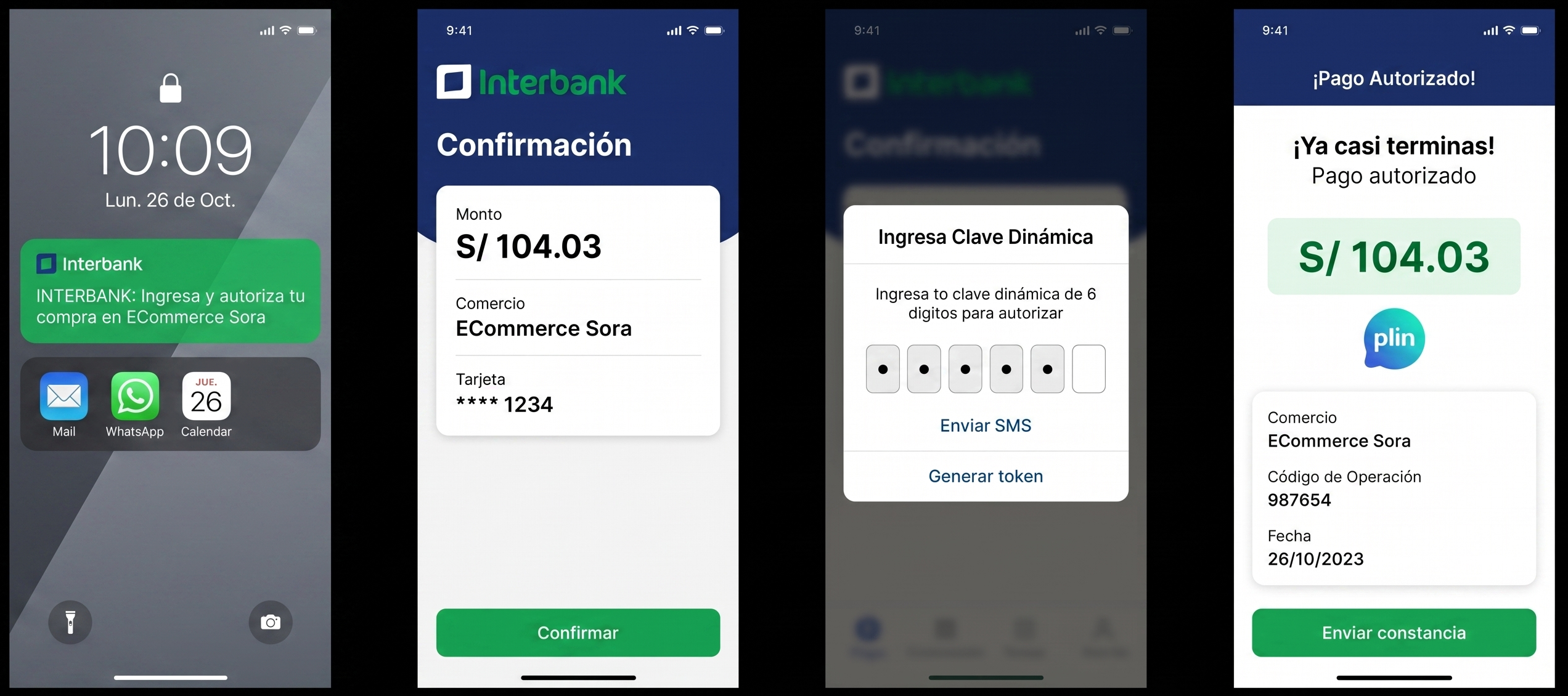
1. The customer selects **Plin** as the payment method and selects their bank.
2. The Merchant sends the Purchase request with `PaymentMethod` set to `PLN`, the customer's phone number, and the selected bank's `financialInstitutionCode`.
3. Bamboo creates the order and returns a `PENDING` status.
4. The customer receives a push notification from their bank. If they do not receive it, they can open their banking app and find the pending payment in the **Approvals** or **Plin** section.
5. The customer reviews the payment details and authorizes or rejects the payment.
6. Bamboo sends the final `APPROVED`, `REJECTED`, or `CANCELLED` status to the Merchant through a webhook notification.
7. The customer views the payment result in their banking app and returns to the Merchant's page.
Plin does not redirect the customer to a bank or to URLs configured by the Merchant. The `Action` object is always `null`. The customer can receive a push notification from their bank or open their banking app to authorize the payment. After completing the payment, the customer returns to the Merchant's page.
### Customer experience by bank
| Step | Interbank | BBVA | Scotiabank |
| ------------------- | ------------------------------------------------------------------- | -------------------------------------------------------------------------- | --------------------------------------------------------------------------------- |
| Notification | The customer receives a push notification. | The customer opens the app manually if they do not receive a notification. | The customer opens the app manually if they do not receive a notification. |
| Location in the app | **Pago a comercio** | **Plin** | **Aprobar compra online** |
| Validation | The customer enters an 8-digit dynamic key and selects **Plinear**. | The validation flow varies. | The app auto-completes the validation key and the customer selects **Confirmar**. |
### Order expiration
The order is valid for 3 minutes after Bamboo creates it. This period cannot be configured. If the customer does not authorize the payment during this period, the transaction changes to `CANCELLED`.
### Transaction states
| Status | Description |
| ----------- | ------------------------------------------------------------------------------------------- |
| `PENDING` | The order was created and is waiting for the customer's authorization in their banking app. |
| `APPROVED` | The customer authorized the payment. Bamboo sends a webhook notification. |
| `REJECTED` | The customer or bank rejected the payment. Bamboo sends a webhook notification. |
| `CANCELLED` | The order expired after 3 minutes or was cancelled. |
## Request parameters
The following parameters are required specifically for this payment method.
Refer to the [Create a Purchase](create-purchase#request-parameters) guide for authentication and global fields such as `Amount`, `Currency`, and `Order`.
| Property | Type | Mandatory? | Description |
| ----------------------------------------- | -------- | :--------: | ------------------------------------------------------------------------- |
| `PaymentMethod` | `string` | Yes | Must be `PLN`. |
| `TargetCountryISO` | `string` | Yes | Must be `PE`. |
| `Description` | `string` | No | Description of the Purchase. |
| `Customer` → `Email` | `string` | Yes | Customer's email address. |
| `Customer` → `FirstName` | `string` | No | Customer's first name. |
| `Customer` → `LastName` | `string` | No | Customer's last name. |
| `Customer` → `DocumentType` | `string` | No | Use a valid value from the [Document types table](/peru#/document-types). |
| `Customer` → `DocumentNumber` | `string` | No | Customer's document number. |
| `Customer` → `PhoneNumber` | `string` | Yes | Phone number registered with Plin. |
| `MetaDataIn` → `financialInstitutionCode` | `string` | Yes | Code for the customer's bank. See [Supported banks](#supported-banks). |
### Request example
```json
{
"PaymentMethod": "PLN",
"Order": "PE-PLIN-0001",
"Amount": 10403,
"Currency": "PEN",
"Description": "Bus ticket Lima to Trujillo",
"TargetCountryISO": "PE",
"Customer": {
"FirstName": "Juan",
"LastName": "Perez",
"Email": "user@example.com",
"PhoneNumber": "969929157",
"DocumentType": "DNI.PE",
"DocumentNumber": "12345678"
},
"MetaDataIn": {
"financialInstitutionCode": "003"
}
}
```
## Response parameters
The API response confirms that the payment request was successfully created. The Purchase starts with `PENDING` status while the customer authorizes the payment in their banking app. Bamboo sends the final result through [webhook notifications](https://docs.bamboopayment.com/reference/webhooks).
| Property | Type | Description |
| ------------------------- | -------- | --------------------------------------------------------------------------------- |
| `TransactionId` | `string` | Unique identifier for the transaction in Bamboo. |
| `Result` | `string` | Result of the operation. The initial response returns `COMPLETED`. |
| `Status` | `string` | Initial status of the Purchase: `PENDING`. |
| `Action` | `null` | Always `null` for Plin. The customer authorizes the payment in their banking app. |
| `PaymentMethod` → `Brand` | `string` | Payment method brand: `Plin`. |
| `PaymentMethod` → `Type` | `string` | Payment method type: `BankTransfer`. |
### Response example
```json
{
"TransactionId": "345200079776418944",
"Result": "COMPLETED",
"Status": "PENDING",
"ErrorCode": null,
"ErrorDescription": null,
"Created": "2026-08-10T13:41:52.688",
"AuthorizationDate": "2026-08-10T13:41:58.561",
"AuthorizationCode": "",
"Amount": 10403,
"Currency": "PEN",
"Installments": 1,
"TaxableAmount": null,
"Tip": null,
"Url": "https://api.bamboopayment.com/v3/api/transaction/345200079776418944",
"MetadataOut": {},
"Action": null,
"PaymentMethod": {
"Brand": "Plin",
"CardOwner": null,
"Bin": null,
"IssuerBank": null,
"Type": "BankTransfer",
"Expiration": null,
"Last4": null
},
"CardOnFile": null
}
```
## Webhook notifications
Implement a webhook endpoint to receive the final `APPROVED`, `REJECTED`, or `CANCELLED` status. Bamboo sends the notification after the bank confirms the payment result.
Respond with HTTP `200` to acknowledge each notification. Use `TransactionId` to handle duplicate notifications idempotently. For the notification structure and delivery details, see [Webhook Notifications](https://docs.bamboopayment.com/reference/webhooks).
## Refund flow
Plin refunds are processed asynchronously. After you submit a refund request, the Merchant receives a `PENDING` status. Bamboo updates the refund to `APPROVED` or `REJECTED` once Plin processes it.
| Refund type and timing | Processing behavior |
| ------------------------------------------------------------------- | --------------------------------------------------------------------------------------------------------------- |
| Partial refund requested on the same day as the Purchase | The refund is queued and processed after 08:00 Peru time. |
| Total or partial refund requested between 00:00 and 08:00 Peru time | The refund is queued and processed after 08:00 Peru time. |
| Refund requested on the day after the Purchase (D+1) | The refund follows the asynchronous process: it starts as `PENDING` and is updated to `APPROVED` or `REJECTED`. |
Plin supports full and partial refunds for approved transactions. Same-day voids are also available.
## Discover the API
Review the complete Purchase request and response structure.
Configure your endpoint to receive final transaction statuses.
Review error responses and how to handle them.